
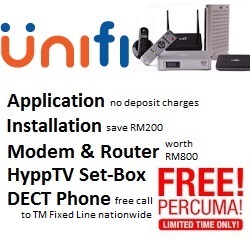

unifi fiber availability map,unifi fiber availability map coverage,unifi fiber availability map promotion,unifi fiber availability map mobile.

# Unifi Fiber Availability Map: How to Check Coverage in Your Area
Whether you are moving to a new home, looking to upgrade your remote work setup, or simply tired of buffering during movie nights, having a reliable fiber connection is no longer a luxury—it is a necessity.
As the largest telecommunications provider in Malaysia, Telekom Malaysia’s **Unifi** offers extensive high-speed fiber broadband across the nation. However, fiber availability still depends heavily on localized infrastructure. This article explains how to navigate the **Unifi Fiber Availability Map** and what steps you can take to get your home connected.
## How to Check the Unifi Fiber Availability Map
Unlike traditional static maps that can quickly become outdated, Unifi utilizes a dynamic, address-based **Fibre Broadband & 5G Coverage Checker**. This tool allows you to instantly verify if high-speed fiber cables have been laid near your specific building or housing estate.
### Quick Steps to Check Coverage
To find out if your home is fiber-ready, you can use Unifi’s digital channels:
1. **Visit the Official Coverage Portal:** Head over to the [Unifi Check Coverage Page](https://unifi.com.my/check-coverage).
2. **Input Your Exact Address:** Type in your state, city, street name, and building/house number. The search bar will auto-suggest registered locations.
3. **Use the GPS Feature:** Alternatively, if you are currently at the physical property, you can click **”Use My Location”** to let the system pinpoint your coordinates.
4. **View Your Results:** The system will instantly display whether Unifi Fiber is available, along with alternative options like Unifi Air (wireless 4G/5G broadband) or 5G mobile coverage if fiber is not yet deployed.
## Why Is Fiber Availability Highly Localized?
It is common to find that one side of a street has access to blazing-fast gigabit fiber, while the other side does not. This discrepancy is due to a few critical infrastructure factors:
* **Fiber Distribution Points (FDP):** Fiber internet relies on physical ports called FDPs (often seen as small grey boxes on telephone poles). If all ports on your nearest FDP are fully occupied by your neighbors, the system will show “no availability” even if the physical cable passes right by your house.
* **Internal Building Wiring:** Many older high-rise condominiums or apartments still rely on copper wiring (VDSL) instead of optical fiber. Unifi is actively upgrading these buildings, but it requires approval and cooperation from local building management (JMB).
* **Local Regulations & Right of Way:** Laying physical cables requires local municipal permits to dig roads or install poles, which can delay rollouts in specific neighborhoods.
## What to Do If Unifi Fiber Is Not Available
If the coverage checker returns a “not available” result for your address, do not lose hope. You have a few immediate options:
> **Submit a Demand Request:** If your address is not covered, you can submit your details to Unifi’s “demand list”. When enough residents in an area request service, TM prioritizes that zone for infrastructure expansion.
### Alternative Solutions While You Wait
| Option | Best For | What It Is |
| **Unifi Air** | Quick setup without drilling | A plug-and-play wireless router that uses TM’s 4G/5G mobile network to provide unlimited home Wi-Fi. |
| **UNI5G Postpaid** | Individuals and light users | Mobile plans offering high-speed 5G data and hotspot capabilities. |
If you are planning to relocate to a new address, Unifi recommends checking the coverage of your new location well in advance. If fiber is available, you can easily schedule a relocation slot through the MyUnifi app or by visiting a nearby TMpoint.
Firstly, Need UniFi for home or your business?
Click on the link below to check the address and registration online


Secondly, Registration UniFi installation in your area
Please provide your full address ( no unit / lot , floor , building , park etc ) for review
For further inquiries , please contact us ( online form )
or via email : ✉unifiandstreamyx@gmail.com
Why register with us ?
- TRUSTED : We are an authorized and registered agent for TM UniFi .
- SAVE : No need to TM Point , crammed in traffic , looking for parking and so on .
- EASY : Questions and registration is done by email / online .
- QUICK : Registration is fast 15-30minit after the personal details and documents obtained .
- Installation can be scheduled as early as 2-3 days .
- ALWAYS HAVE to answer your questions about the package , coverage and related questions .
- Experience more than 1 years in the registry and install UniFi .
- TRUE : We gave the correct answer , without exception , without any doubt .
- HELP : If you have problems port full / missing units / etc. we ‘re here to help .
- SAFE : Information and personal data safe without any violation of privacy .
Please check coverage , see the package unifi , register online or contact us for more information .
Unifi is not in your area? Let’s get UniFi Mobile.
Firstly, Need UniFi for home or your business?
Click on the link below to check the address and registration online
Secondly, Registration, Streamyx and UniFi installation in your area
Please provide your full address ( no unit / lot , floor , building , park etc ) for review
For further inquiries , please contact us ( online form )
or via email : ✉unifiandstreamyx@gmail.com

No deposit charges

Save RM200 with free installation ( limited offer )
Modem , WiFi router , HyppTV set and wireless DECT phones are free ( worth RM800 )

Talk more with free calls all over the country ( Landline TM )
This is our free channels 免费视频, Love, Like, Share, View, fyp
AI Software Channels AI神器推介
AI Hardware Channels AI硬件推荐
Renewable Energy Channels 比利珍藏
Love, Like, Share, View, fyp